Feature Autocomplete
Write the next
ten lines with
one Tab.
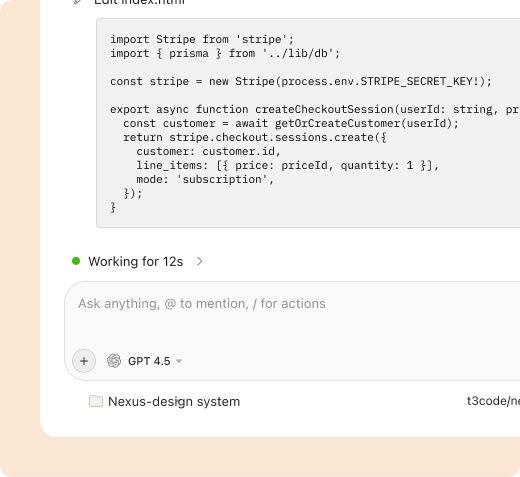
Nexus Autocomplete predicts your next edit from your entire project, not just the open file. Accept multi-line suggestions with Tab and keep your hands on the keyboard.
- median time to a suggestion
- <80ms
- of new code accepted straight from Tab
- 35%
- to accept, Esc to dismiss
- 1 key
Stay in flow while you type
- 01
Start typing
Write a name, a comment or the first line of a function. Nexus already knows the files around it.
- 02
See the whole edit
Autocomplete suggests the next lines, imports and related changes, shown in grey ahead of your cursor.
- 03
Tab to accept
Press Tab to take it, keep typing to refine it, or press Tab again to jump to the next edit.
Suggestions that understand your project
-
Multi-line
Whole blocks, not single words
Autocomplete writes full functions, test cases and JSX trees that follow the patterns already in your codebase.
- Multi-line Tab completions
- Learns your naming and style
- Partial accept word by word
-
Smart imports
Imports that write themselves
Use a component or helper from anywhere in the repo and Nexus adds the right import path, aliases included.
- Resolves path aliases
- Removes unused imports
- Works in TS, Python, Go and more
-
Next edit
Jump to the next change
Rename a prop and Tab takes you to every place that still uses the old name, with the fix ready to accept.
- Predicts follow-up edits
- Tab to jump between them
- Stays inside the current file
Where Tab saves the most time
Boilerplate
Handlers, reducers and config files that follow a pattern you already have.
Tests from examples
Write one case and Tab suggests the next ones.
Types and schemas
Fill interfaces and validation from the data you are using.
Renames in a file
Change one usage and accept the rest with Tab.
Doc comments
Summaries and parameter docs that match the code below.
Unfamiliar APIs
Suggestions based on how your team already calls them.
“I stopped noticing Autocomplete, which is the best compliment. It just writes the line I was about to write.”
The details
Everything you need to know before you turn on Autocomplete.
Compare plans- Where it runs
- VS Code, JetBrains IDEs and the Nexus desktop app
- Latency
- Under 80ms median on a normal connection
- Context
- Open files, recent edits and related files from the index
- Controls
- Turn off per language, per file type or per project
- Plans
- Unlimited on every plan, including Free
- Privacy
- Your code is never used to train models. SOC 2 Type II
Autocomplete FAQ
Suggestions need a connection to Nexus. Your editor keeps working as normal when you are offline, just without completions.
Yes. Disable it per language, per glob pattern like *.env or for a whole project from settings.
Yes. Autocomplete is unlimited on every plan. Paid plans add Agent, longer Chat context and team features.
It reads the files near your cursor and similar code from your project index when it suggests. Nothing is trained on your code.
Can’t find your answer? Contact our support team